
How Multilogin Cloud Phones Simplify CapCut Workflows for Remote Teams

Remote teams move quickly, but mobile content workflows often lag behind.
CapCut makes short-form video editing easy, yet the process around it can become difficult once multiple people, accounts, and publishing schedules are involved. A video may be edited by one teammate, reviewed by another, and published by someone else entirely. When that workflow depends on physical phones, the process becomes harder to manage.
Files need to be moved between desktop and mobile devices. Team members may have to log in and out of apps repeatedly. In some cases, the phone used for publishing is not even in the same office as the editor. These gaps create delays, confusion, and unnecessary coordination.
Multilogin cloud phones offer a more practical way to handle this. By moving CapCut workflows into cloud-hosted Android environments, remote teams can upload footage, edit videos, keep app sessions stable, and publish from the same setup without relying on physical devices.
For agencies, content teams, and businesses producing short-form video at scale, this creates a more organized and efficient system for daily operations.
Why CapCut workflows become harder as teams grow
CapCut is designed for fast editing, but remote production usually involves more than just editing.
In many teams, the workflow is spread across several tools and devices. Raw footage may be stored on a laptop, editing happens on a mobile device, approvals are shared in chat or email, and publishing happens from a separate phone logged into the correct social media account. While this may work for a solo creator, it becomes difficult to manage across multiple accounts, clients, and team members.
As the team grows, the number of handoffs grows with it. More devices, more people, and more accounts create more room for delays and mistakes. A process that once felt manageable can quickly turn into a bottleneck.
The main problems with physical-phone workflows
Remote content teams often run into the same operational issues when they depend on physical devices.
- File transfers slow everything down: Footage often has to be moved from desktop to mobile before editing can even begin. After editing, teams may still need another device for posting.
- Access is tied to one device: If the phone is with one teammate or stored in one office, everyone else depends on that person or location.
- Repeated logins interrupt the workflow: When sessions expire, editors and publishers waste time logging back into CapCut, TikTok, Instagram, or other apps.
- Shared devices create confusion: Using one phone across several clients or projects makes it harder to track ownership, drafts, and account access.
These issues do not just make work slower. They also make the workflow less predictable and harder to scale.
How Multilogin cloud phones support remote CapCut workflows
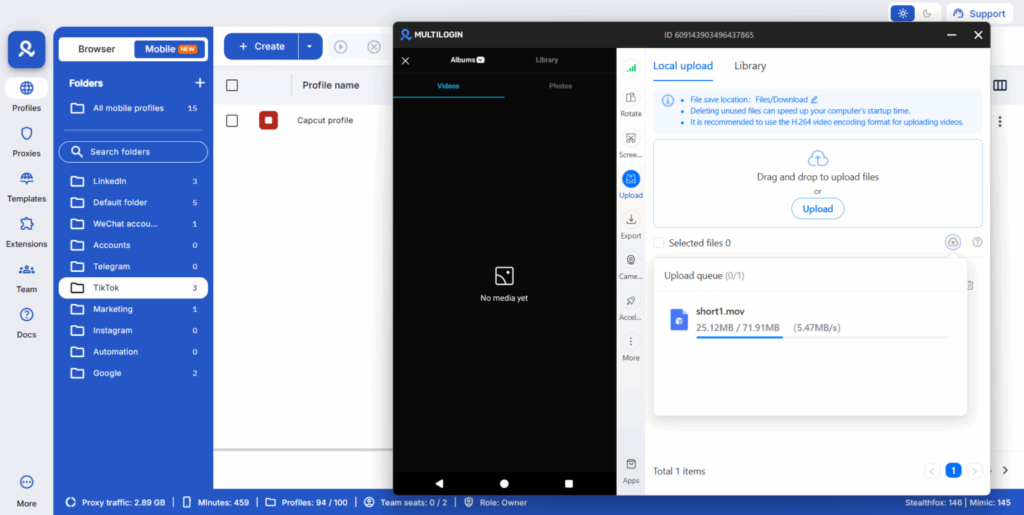
Multilogin cloud phones are especially useful because they give teams dedicated Android environments hosted in the cloud. Instead of building a workflow around a small number of physical phones, teams can organize their work inside mobile setups that are easier to access, assign, and manage.
A team can create one cloud phone for a specific client, brand, or campaign. They can upload files directly into that environment, install CapCut from the built-in marketplace, edit videos, and keep the same setup ready for publishing. Because the device stays available from the dashboard, the workflow no longer depends on where a physical phone is located.
=> Learn more about how to install CapCut on cloud phones in Multilogin!
One environment for editing and publishing on CapCut
One of the biggest advantages of cloud phones is that they keep the entire workflow in one place.
Teams can upload footage, edit it in CapCut, and publish it directly to TikTok or Instagram from the same mobile environment. This reduces extra steps, minimizes errors, and makes the publishing process easier to manage across multiple accounts. For teams focused on TikTok, it also becomes easier to apply short-form video best practices during publishing.
Keep desktop editing, make publishing easier for teams
Most creators already know CapCut works well on desktop, and many teams are comfortable keeping their editing workflow there.
The real advantage of cloud phones is not forcing a switch to mobile editing, but making the path from desktop to publishing much easier. Teams can move finished videos from their computer into the cloud phone environment and publish directly to TikTok, Instagram, or other mobile-first apps without depending on one physical device or passing hardware around.
This also makes collaboration smoother for distributed teams, since different teammates can access the same mobile setup to review, prepare, and publish content while keeping the workflow consistent.
Better account organization across clients and projects
As soon as a team manages more than one social account, structure becomes essential.
Using a single phone for various clients or brands often leads to a tangled web of drafts, logins, and questions of who owns what. Multilogin cloud phones simplify this by giving teams the ability to assign a unique environment to each account or project.
This separation simplifies workflow management and facilitates scaling. You could dedicate one environment to a specific client, while another might cater to a different region, campaign, or creator.
Instead of mixing activity inside shared devices, teams can keep operations clearly separated.
Stable sessions make teams more efficient
Repeated logins are a small problem that often turns into a big productivity drain.
If a teammate opens a device and finds that the social app session has expired, work stops immediately. That becomes even more frustrating when multiple apps are involved and several people work on the same publishing flow.
Multilogin cloud phones help reduce that issue by keeping the mobile environment persistent. Installed apps, session history, and app data remain available between sessions, so teams can return to the same workspace without rebuilding it each time.
Key Multilogin cloud phone features for agency workflows
For content agencies, Multilogin delivers the features needed to streamline CapCut workflows at scale.
- Real Android environments: Run native mobile apps on genuine Android versions 10 to 15.
- Dedicated devices: One cloud phone per account ensures consistent device setup and no overlap. This is ideal for team assignments.
- Persistent data: App sessions and cache are saved. Logins are saved too. This supports natural account behavior and reduces setup time for editors.
- Full compatibility: Install any app from the built-in store or upload your own APK files. It works just like on a physical phone.
- Integrated proxies: Access 150+ locations with automated connection handling for easier geo-specific targeting.
- Unified dashboard: Manage both mobile and web accounts from one platform for simpler agency oversight.
- Flexible pricing: Usage-based pricing starts from 0.009 Euro per minute. Unused minutes roll over. This offers cost-effective scaling.
- All-in-one solution: Access a leading antidetect browser alongside your cloud phone purchase. This provides a complete toolkit for digital operations.
When cloud phones make the biggest difference
Cloud phones are especially valuable when a team is:
- managing multiple social accounts
- working across several clients or markets
- coordinating editors, managers, and publishers in different locations
- posting content frequently at scale
- struggling with device sharing, account access, or repeated setup work
In these cases, the benefit is not only convenience. It is workflow control.
Conclusion
CapCut is excellent for short-form video editing, but the surrounding workflow becomes much harder when remote teams still rely on physical phones.
The challenge is not the editing itself. The challenge is everything around it: moving files, sharing devices, managing logins, coordinating access, and keeping publishing on schedule.
Multilogin cloud phones simplify that process by bringing editing, account access, and publishing into dedicated Android environments that can be accessed from anywhere. Teams can work more consistently, collaborate more easily, and manage multiple projects with less friction.
For remote teams producing short-form content at scale, that creates a cleaner, faster, and more manageable way to run CapCut workflows.


Why Internal Linking Matters for Website SEO

Leading AI Video Generators for Creators in 2026

Optima Tax Relief Explains What an IRS Audit Lawyer Does and How They Protect You

The Physiology of Good Decisions: How Damian Creamer Manages Energy, Not Just Time

Stakeholder Capitalism’s Persistent Advocate: Lynn Forester de Rothschild and the 2026 ESG Rankings
Leading AI Video Generators for Creators in 2026
Why Internal Linking Matters for Website SEO
Optima Tax Relief Explains What an IRS Audit Lawyer Does and How They Protect You