
Browser Push Notifications: A Complete Guide for Businesses

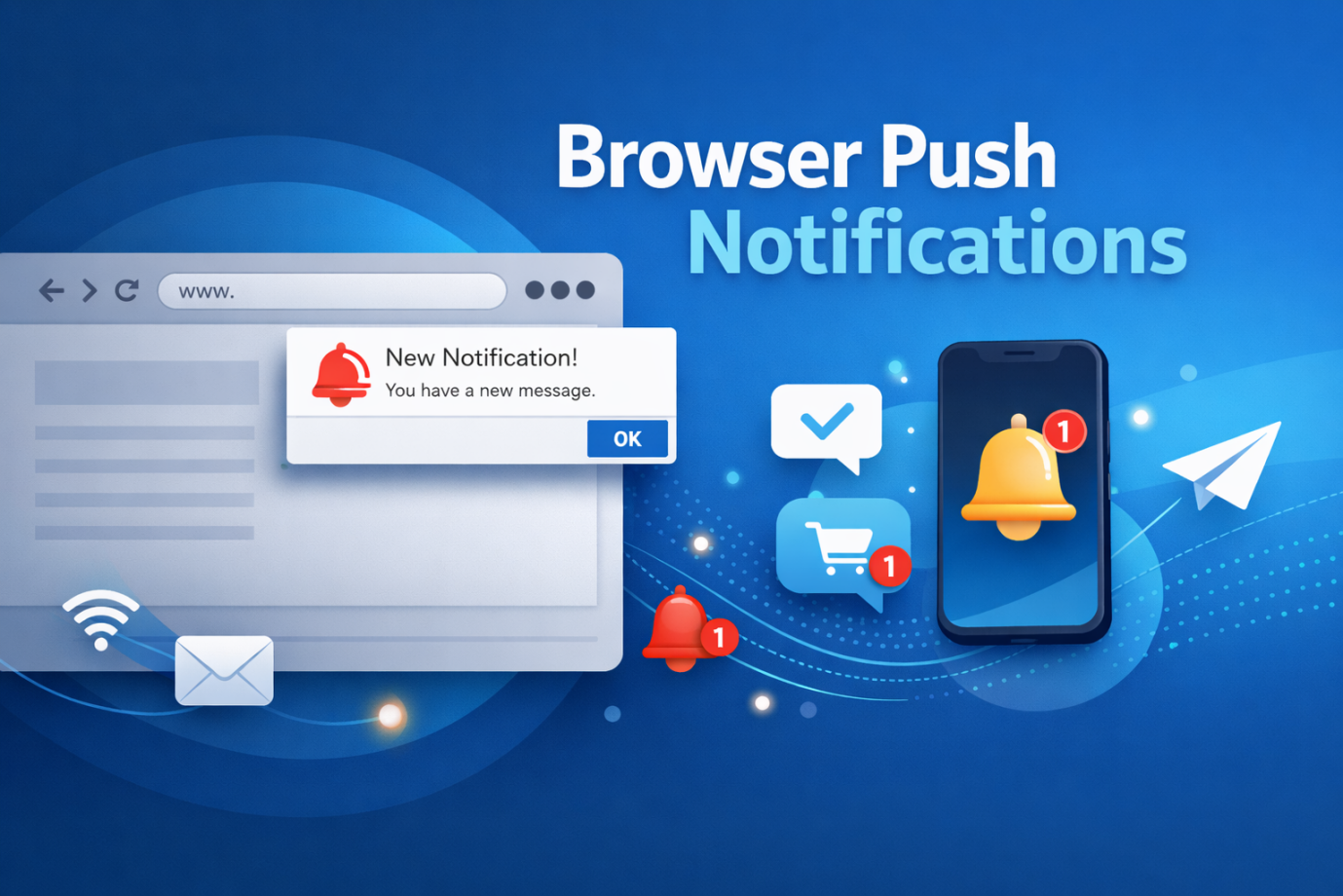
Browser push notification is one of the most effective tools of real-time engagement. These applications come in the form of direct messages to the business person/user on their web-based device so that companies can deliver updates even when the user is not actively browsing the site.
Push messaging is an effective tool that has good data. Research indicates that push notifications boast an average open rate of approximately 41.2% in the world, which is way more than those offered by many marketing channels.
As permissions-based and instant-access systems, push notifications enable businesses to re-engage users, cross-sell and increase site attendance without working for the user’s attention in an email inbox or demanding that they access the site.
If you’re wondering What are browser push notifications and how they work, you should read this post. So let’s take a look at the technology behind browser push notifications work, what their core components are, and how your business can use them to deliver superior user experiences.
What Are Browser Push Notifications and How They Work?
Definition of Web Push Notifications
Push notifications are notifications that are sent via a web page to the browser of a user after he or she has authorized the receiving of the messages. These messages will be visible on the devices even when the user is not actively at the site.
Push notifications also appear on the browser immediately unlike emails which involve the user opening his/her inbox. They are usually accompanied by an icon, message, title, and a clickable link leading the user to a correlated page.
These are compatible with the major browsers, including Chrome, Firefox, Edge, and Safari. They are permission-based, and therefore users will need to receive messages first. This makes sure that the recipients of the notifications are really interested in the information.
Key Components of a Browser Push Notification
Each push notification has a few elements that are normally relevant and which define its effectiveness.
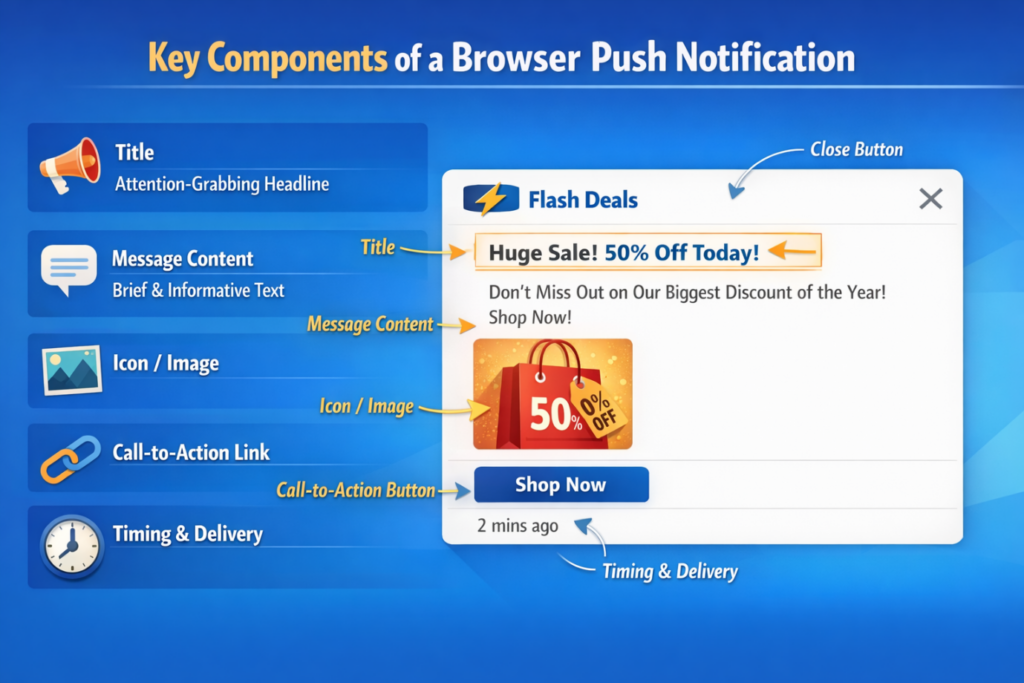
1. Title
The title that will attract the attention of the user. A concise and attractive title also enhances the chance of a user clicking on the notification.
2. Message Content
The primary text which conveys the intention of the notification. It must be brief and educational.
3. Icon or Image
The use of visual materials enables users to identify the sender very easily or comprehend the message.
4. Call-to-Action Link
When a user clicks on the notification it gets them to a landing page, product page, or article.
5. Timing and Delivery
The notifications may be sent instantly or planned at the most appropriate times of engagement.
All of these combined will assist in making the message interesting, applicable, and actionable.
How Browser Push Notification Technology Works
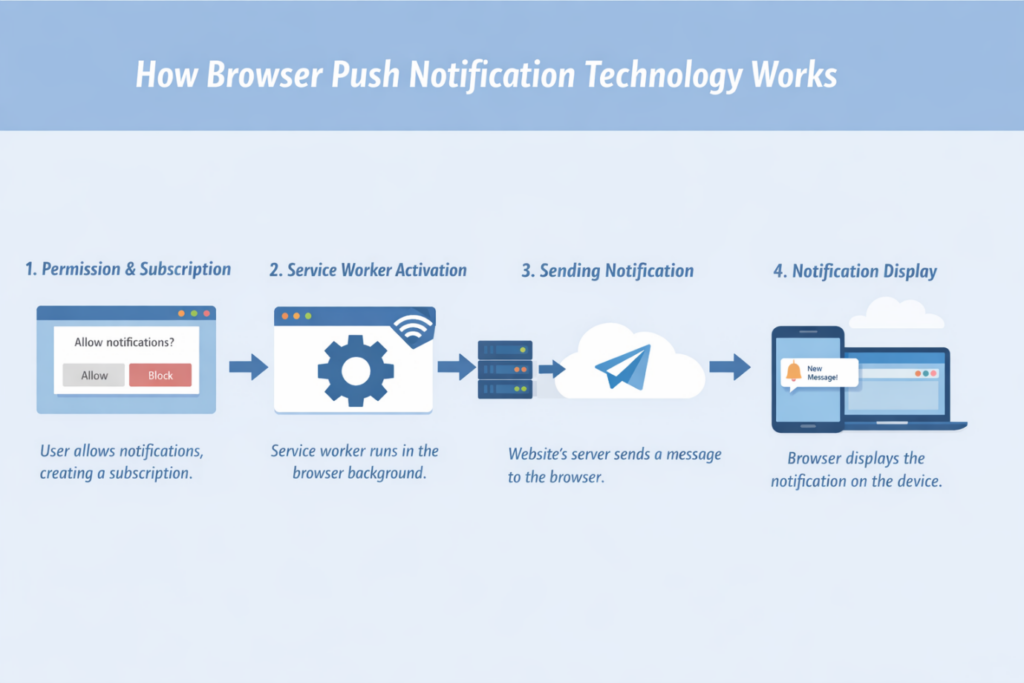
The technology that is used to support push notifications is based on browser API, service workers, and messaging servers. These elements combine to provide messages instantly to the users, even when they are not surfing on the web.
1. Permission and Subscription to the User
The whole process starts with the request of a site to send messages. Providing the user does accept, the browser forms a subscription that links the device of the user with the notification service of the webpage. Through this subscription, the site is in a position to send messages to that particular browser.
2. Service Worker Activation
Once the subscription is made a service worker is installed in the browser. Background script A background script is a service worker, which is independent of the webpage. It enables the site to accept, as well as process, messages even when the user is not actively surfing on the site.
3. Sending the Notification
The notification server is used when the message needs to be sent by the website to the browser using the push service.
4. Notification Display
The message is received by the browser and after processing the request, the notification is shown on the device of the user. It all takes a few seconds, which makes push notifications one of the most effective and rapid communication channels that can be found online.
Why Do Businesses Use Browser Push Notifications?
Companies are always seeking the best communication systems that will target consumers in real-time. Push notifications offer a very easy and efficient means of reaching audiences without having to rely on their overflowing email inboxes or social media algorithms.
Push notifications are being utilized in the companies of all fields, including e-commerce and media, finance and travel, to provide timely updates, offers, and personalized messages.
Benefits of Browser Push Notifications
Instant Communication
Push notifications are received instantly and this enables businesses to present critical updates instantly.
Higher Engagement Rates
In comparison to most other digital platforms, push notifications tend to command more interaction since they are displayed on the devices of users.
Personalized Messaging
Businesses are able to divide their audience and deliver customized messages to it regarding personal behaviors, interests, or geography.
Increased Website Traffic
Every notification contains a clickable link that directs the users to the site, allowing more page views and interaction.
Enhanced Customer Retention
Frequent yet timely updates will keep the users in touch with a brand in the long term.
Common Use Cases Across Industries
Push notifications are applicable in most industries with the aim of enhancing customer communication and marketing performance. They are used by businesses to provide real-time updates, higher interaction, and revisit their websites.
E-Commerce
Online stores rely on the web push notification feature known as mark.
Indicatively, Amazon sends browser notifications to remind a customer of price reductions, order status, and personalized product suggestions. Marketing reports suggest that personalized push notifications in e-commerce can raise the conversion rates by up to 910%, especially when it comes to abandoned cart recovery campaigns.
News and Media
Publishers send alerts of breaking news and trending stories to their clients immediately.
A famous example is that of the BBC, which relies on browser notifications to deliver breaking news and updates on events that are going on. Publishers of news that apply push alerts have shown a growth in engagement of more than 20–30%, since readers get updated immediately rather than waiting to visit the site again.
Finance and Banking
Financial platforms notify about transactions, security, and account changes.
PayPal provides browser notifications to notify users about payments, suspicious account activity, and account verifications. Such instant alerts assist financial services to enhance the level of security awareness as well as the level of interaction and confidence of the user to the platform.
Travel and Hospitality
Push notifications are used in travel companies to confirm the booking, update flight details, and promotional offers.
Such companies as Booking.com provide real-time updates on price changes, reservation confirmations, and rare travel deals. An analysis of industry reveals that booking conversion can be elevated by more than 25% when timely travel notifications are sent to users that contain information about lower prices or a limited number of available options.
SaaS and Online Platforms
Software firms alert users on updates of features, system alerts, and product hints.
Indicatively, Slack uses notifications to notify users of new messages, mentions, and workspace updates. Instant messages are an essential part of SaaS interaction that assists the platform in terms of ensuring active functioning every day and quicker reactions to the messages.
All these examples serve to illustrate how universal and adaptable the push notification technology can be in any industry and allow businesses to communicate fast and make people aware with up-to-date information.
How to Implement Browser Push Notifications?
Push notifications are not usually complicated to implement, as there are only several technical steps involved, however, modern tools simplify the process of push notification implementation as it has never been before.
1. Pick a Push Notification Platform
Choose the platform with the infrastructure of push notifications such as user subscriptions, message delivery, and analytics. The solution that businesses should select must allow big browsers and provide features like automation and audience segmentation as well as monitoring performance.
2. Add a Subscription Prompt
The site should then serve a permission prompt to the user to request them whether they wish to get notifications or not. The notification normally shows up when a user visits the site or when he or she visits a specific page. Once the user clicks on the “Allow” button, a subscription is created and this enables the application to send notifications to the user.
3. Install Service Workers
Background scripts that are run on the browser and respond to push messages are called service workers. They allow one to receive and show the notification at any time even when the user is not present on the site, hence being in real-time contact with subscribers.
4. Segment the Audience
When the users subscribe, the businesses are then able to segment them based on their behaviour or interest, location or past interactions. Segmentation allows companies to deliver more notifications that are more relevant and personal, which can in turn lead to a great level of engagement.
5. Write and Send Campaigns
Businesses are able to compose notification campaigns having a title, a short message, an icon, and a link to a particular page on the dashboard of the platform. Notifications may be sent on the spot, at a scheduled time, or as specific user activities.
6. Monitor Performance
Delivery rates, clicks, and engagement are monitored with the help of analytics tools to maximize campaigns.
The process makes sure that notifications are delivered to the appropriate users when required.
Best Practices of Browser Push Notifications in 2026
The upcoming modern era is of staying relevant and highly connected with the customers and browser push notifications are effective, relevant, and easy to use means for that. Notifications help enhance engagement, as long as they are done carefully not to annoy users.
Get Permission at the Appropriate Time
Do not show permission prompts the moment the users visit a site. Rather, enable visitors to browse the site as well as engage with certain content. Requesting a user to allow permission when he or she has already expressed curiosity like by scrolling through multiple pages or spending time on the site, increases chances of receiving notifications.
Keep Messages Brief and to the Point
The message should be provided in a very fast and articulate manner by use of push notifications. Because people do not spend long reading the notifications (a few seconds are enough), concise text enhances better reading and higher chances of a click. Keep to the point and use unnecessary words.
Use Personalization
Individual messages are much more efficient than standardized messages. Companies are able to divide the audience in terms of interests, browsing history, location, or past experience. This enables them to deliver useful messages instead of promotional ones, hence enhancing high levels of engagement.
Optimize Sending Time
The success of push notifications depends on timing. Messages dispatched at times when the users are the busiest, like at the peak hours when they are most active in their browsing, have more chances of reading and opening. Most of the platforms have the ability to schedule and an analytics system that can be used to figure out when it is most appropriate to send a notification.
Avoid Over-Sending
Excessive notifications may easily frustrate the users. Users can turn off the notifications or stop receiving emails when they are overwhelmed. A balanced frequency is also necessary to make sure that notifications are useful and not annoying.
Use Rich Media
Notifications can be made more prominent and interesting by adding some visuals like icons, pictures, or even some minor emojis. The rich media will aid in attracting attention and it will be able to convey the message better than using text alone.
Adhering to these best practices would make sure that the browser push notification would be useful and interesting and will not be annoying so often the user can start enjoying it and be more involved in general.
Selecting a Browser Push Notification Platform
It is necessary to choose the appropriate platform to control notifications. An excellent platform must have easy integration, automation, segmentation, and analytics.
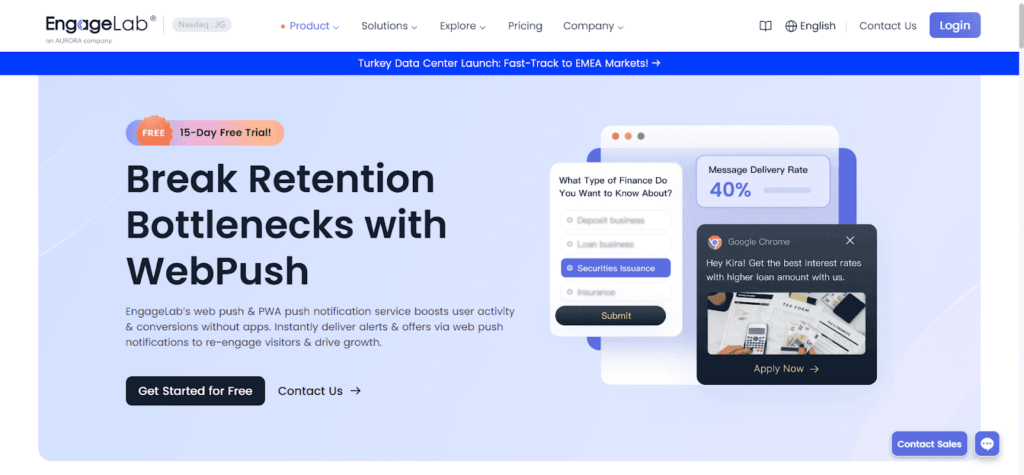
EngageLab is one such platform, which aims to aid businesses with managing the push notification campaigns in more than one channel. EngageLab WebPush is a robust browser push notification software that allows companies to send notifications directly to their users’ devices in real time. Thanks to sophisticated targeting, automation and analytics functionalities, this solution allows brands to interact with their audiences in real-time, keep them engaged, and convert them at higher rates. These features could make EngageLab a good option for companies that want to roll out a successful web push notification program.
Here’s why EngageLab is the best platform:
Multi-channel Messaging Support
Engagement services such as EngageLab may also enable businesses to integrate various communication methods, such as push notifications with other modes of messaging such as in-app messaging, SMS, or email. This cross-channel will aid firms in developing a consistent communication plan and target users using their most favored channels.
Expandable Systems to Support Expanding Companies
With the increase in traffic on the websites and the increase in the number of subscribers, the notification systems will be required to process a large number of messages. EngageLab is a scaled infrastructure that enables companies to deliver lots of notifications using reliable, yet fast and consistent delivery and performance.
State-of-the-art Security and Compliance
The data security and privacy of users are crucial in handling the subscriber data. Engagement solution providers such as EngageLab are designed with security measures and data safety controls that ensure that businesses utilize the user information in a responsible manner without infringing international privacy standards and regulations.
Easy Integration
APIs or the use of plugins allow developers to add notification systems to websites with very little coding.
Audience Segmentation
Users can be grouped depending on their actions, likes, and their history of engagement to businesses.
Automated Campaigns
With the help of automation, it is possible to send the notifications depending on the actions of the users, i.e. on signing up or forsaking a shopping cart.
Performance Analytics
Detailed reporting tools enable the marketers in knowing what message works best and optimize future campaigns.
In platform evaluation, businesses are advised to look at the business scalability, simplicity, integrations, and reporting ability.
Conclusion
Push notification has been a critical communication feature of business in the contemporary world. Companies can provide updates directly to user browsers, thus sharing news, making them interact and returning to their websites in real time.
When equipped with the appropriate tool and platform such as EngageLab, push notifications might turn into a potent component of an online marketing environment of a company. Technology is ever changing, so the businesses with proper notification strategies will have a greater chance of reaching their audience and creating a long-term customer relationship.


How Criminal Charges Can Impact Your Future

BetterThisWorld Money Explained for Beginners

Building Wealth with BetterThisWorld Money Resources

BetterThisWorld Money Features Explained

BetterThisWorld Money Review

Cambridge Businesses Push Back Against Rising Municipal Fee Structures

Midland residents turning to digital payment tools for everyday spending

What Mindset Shifts Drive Long-Term Success

How Portable Samplers Simplify Water Quality Monitoring in the Field
